Industries08 / 08

Workflow automation for office and admin work

Admin and accounts work is full of tidying and reconciling that repeats every month. We can hand those fixed steps to software, gather the items that don't match into one list, and leave your team only the exceptions. Internal systems can also get health checks and backups, so you don't find out something broke only when it has.

01

What we often hear

  • "At the start of every month we paste each branch's Excel file into one summary."
  • "Invoices and bank receipts are matched one by one."
  • "We usually find out an internal system is down when a colleague complains."
  • "The old system still opens, but the data won't come out."
  • "The only way to see how two documents differ is to read them side by side."
024 items

Services that fit

  1. Workflow automation tools

    Automatic Excel merging, reconciliation matching and document comparison, starting as a small tool to measure the time saved.

  2. Integration and long-term support

    Health checks, daily backups and regular restore tests for internal systems.

  3. Legacy application migration

    Exporting data from old systems, or turning Access or VB6 systems into web versions.

  4. Custom B2B management systems

    Internal management such as attendance, leave and file search as one shared system.

036 items

What we could build for you

These are example scenarios showing how such needs can be met. They are not completed client projects.

  • spot the differences between two PDFs

    A purchase order and the supplier's confirmation often differ in small ways — an item name, a quantity, a delivery date — and line-by-line reading misses them. A small tool can have AI read both PDFs, compare them field by field and highlight every mismatch for a person to confirm.

  • merging everyone's Excel files automatically

    At the start of each month, head office copies and pastes spreadsheets from every branch into one master sheet, fixing columns by hand whenever the layout differs. A small tool can read a folder, line files up by column name, merge them and list any file that doesn't fit the format.

  • matching invoices to bank receipts

    Each month the accountant matches issued invoices against bank deposits one by one, and combined payments or deducted bank fees make it slow. Once both lists are imported, entries are matched by amount, customer and date, and whatever doesn't match is collected on one list — the accountant only handles the exceptions.

  • an Access or VB6 program rebuilt for the web

    A long-serving Access or VB6 inventory program opens on only one PC, so colleagues take turns to look things up. We first map its tables and everyday workflows, then rebuild it to run in a browser, bring all the old data across and keep the screens as familiar as possible.

  • monitoring and daily backups

    Internal systems often have nobody watching them; an outage surfaces when staff start complaining, and no one is quite sure the backups still run. Scheduled health checks send an alert when something goes wrong, backups go to a second location every day, and a regular test restore proves they actually work.

  • getting everything out of an old system

    The old system still opens, but its data can only be viewed on screen, with no clear way to export it or move it elsewhere. We first work out how the old system stores its data, then export years of transactions and customer records to Excel or a new database, checking record counts and totals so nothing is lost.

See every scenario for this industry

043 items

Related approaches (real projects)

These are real systems we have built. They share a process or technology with this industry, and most are not clients in it; each note says why it is relevant.
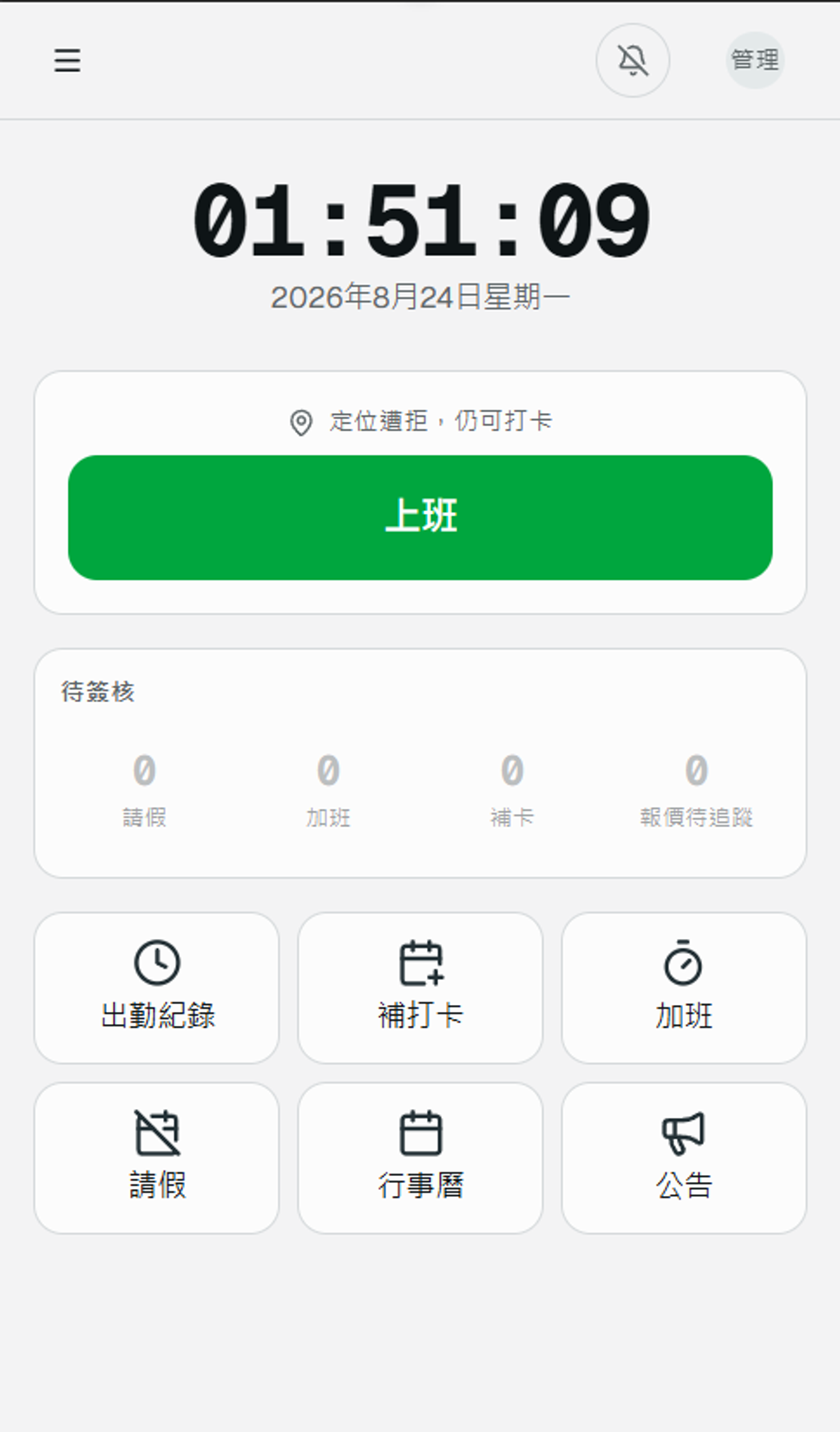
  • The staff-facing phone home screen - one large button to clock in, with pending approvals and record shortcuts below

    Attendance System

    Attendance system where attendance, leave, overtime and annual leave are calculated together, with reports for any date range.
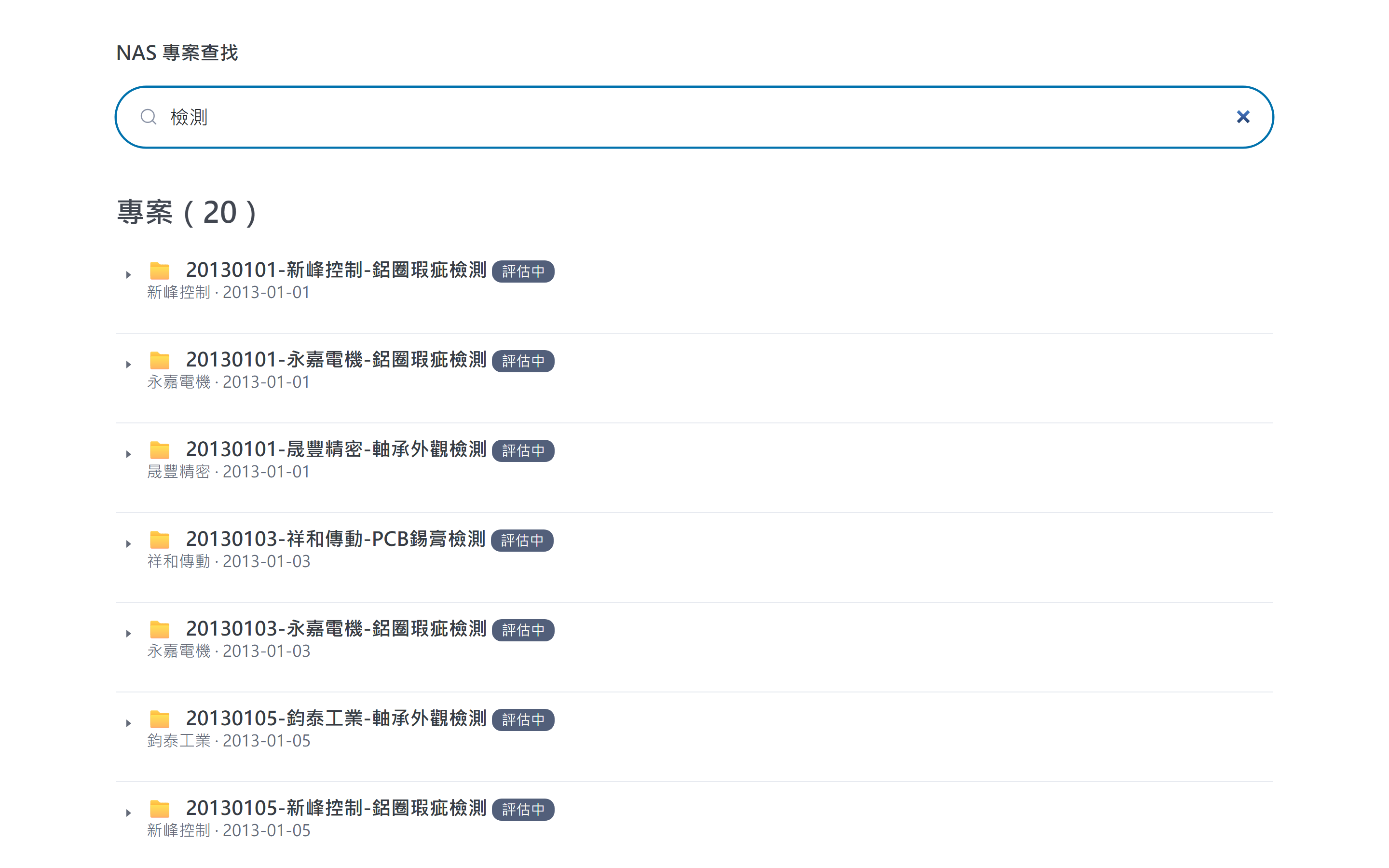
  • Searching "inspection" lists every matching project folder scattered across the NAS, with client and date (demo data)

    Project Archive Search

    Project file system on a local NAS, with instant search and files left untouched.
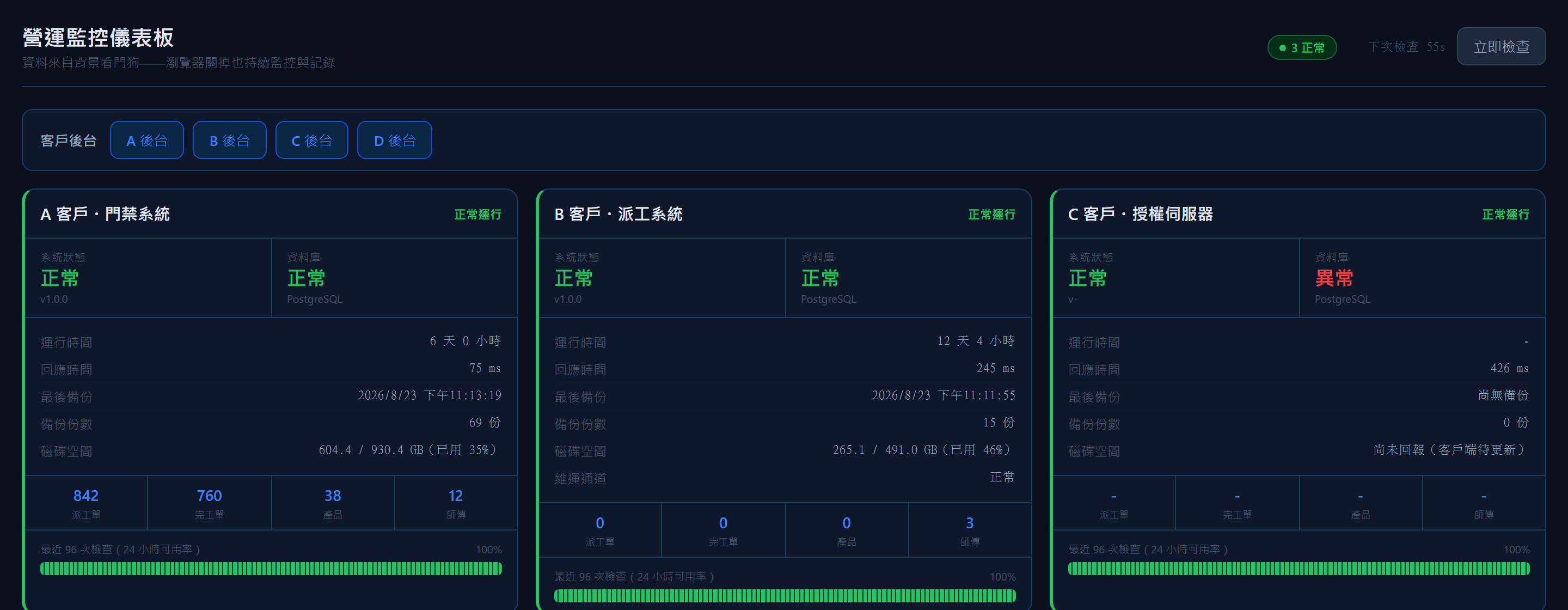
  • The operations dashboard - live status, response time, backup count and disk space per client system, turning red the moment something is off (demo data)

    Operations Monitor

    Operations dashboard that checks system health every minute and alerts on problems.

053 items

Questions

Every branch formats its Excel a little differently. Can they still be merged?

Send us a few real files. Once we understand the rules and exceptions, we align columns by name and list any files that don't fit.

Who maintains the tool afterwards?

We can maintain it, or hand it over to your staff with step-by-step instructions.

How do we know the backups actually work?

Besides daily automatic backups, we restore one for real at regular intervals to confirm it comes back.

Would you like to talk through how your business works?

No specification needed. Tell us which part of your work takes the most time, and we will look at the right approach together.